
Have you ever opened a shopping app, struggled to find a product and closed it within a few seconds? Or used a website where every button seemed to lead you in the wrong direction? These everyday experiences show why a UI/UX Designer matters in the digital world. With the right skills and a practical learning plan, students and working professionals can explore this career through design training, project work and relevant IT distance education.
Every digital product needs more than attractive screens. It must help people complete tasks without confusion, whether they are booking tickets, making payments, attending online classes or searching for information. A designer brings these needs together by understanding users, organising information and creating clear, accessible interfaces.
The interesting part is that you do not necessarily need to be an artist or an expert programmer to begin. Curiosity, observation, problem-solving and a willingness to test ideas can provide a useful starting point.
In this guide, you will discover how UI and UX work together, which skills employers look for, how to choose courses, what projects to include in a portfolio and where this career can lead in India.
One Digital Product, Two Different Responsibilities
Imagine a student opening an education app to find course information. The student wants to locate the programme, understand the eligibility criteria, compare fees and submit an enquiry.
The colours, typography, buttons, icons and page layouts influence how the app looks. The arrangement of information, navigation, clarity and ease of completing the inquiry influence how it works for the user.
Both aspects are important, but they address different questions.
What does a UI Designer do?
A User Interface (UI) Designer focuses on the visual and interactive elements of a digital product. The objective is to make the interface clear, consistent and easy to understand.
Typical responsibilities include:
- Choosing appropriate colours and typography.
- Arranging text, images, buttons and forms.
- Creating reusable interface components.
- Designing layouts for mobile phones, tablets and computers.
- Maintaining consistency across different screens.
- Checking visual clarity and accessibility.
What does a UX Designer do?
A User Experience (UX) Designer focuses on the complete experience a person has while using a product. This includes understanding user needs, identifying difficulties and improving the journey from beginning to end.
Typical responsibilities include:
- Researching user behaviour and expectations.
- Mapping user journeys and organising information.
- Creating wireframes and interactive prototypes.
- Testing whether people can complete important tasks.
- Identifying confusing steps and unnecessary actions.
- Improving the product based on feedback and evidence.
A UI/UX Designer may handle both areas, especially in smaller organisations. In larger teams, UI and UX responsibilities may be divided among specialists.
The important distinction is simple: UI focuses on the interface people interact with, while UX considers the overall experience of using the product.
From a User Problem to a Finished Screen: How Designers Actually Work
Understanding the design process helps you see why the profession involves much more than choosing colours or arranging attractive buttons.
Consider a realistic example: an online shopping app has a complicated checkout process. Customers add products to their carts but struggle to complete their purchases.

A designer should investigate the problem before changing the screen.
Step 1: Understand the problem
Start by identifying what users find difficult. Are delivery charges displayed too late? Is the address form unnecessarily long? Are payment instructions unclear?
The designer can review feedback, interview users and observe how people complete the checkout process.
Step 2: Organise the information
Next, identify the information users need at each stage. Delivery details, order summaries and payment options should appear where they are most useful.
This stage involves information architecture: arranging content so that people can find what they need without searching through unrelated sections.
Step 3: Create a wireframe
A wireframe is a basic representation of a screen. It focuses on structure rather than decorative details.
The designer might sketch a simpler checkout page with clearly labelled fields, visible delivery charges and a prominent payment button.
Step 4: Build an interactive prototype
A prototype allows people to experience a proposed design before it is fully developed. Users can move between screens, select options and test the flow.
This helps the team identify problems before investing time in implementation.
Step 5: Test and improve
Ask a few representative users to complete a task, such as placing an order. Observe where they hesitate, make mistakes or ask for help.
Use those observations to refine the design. A successful redesign is not simply one that looks better; it should make the intended task clearer and easier.
This process is iterative. Designers often return to earlier stages when testing reveals an unexpected problem.
For additional context on how user research, prototypes and usability assessment fit into public digital services, explore the Government of India’s UX4G skill-upgradation resources.
The Skills Behind a Design That Feels Effortless
A well-designed interface often appears simple because someone has already worked through the difficult decisions behind it.
To become a capable UI/UX Designer, you need a combination of practical design skills, user understanding and communication abilities. You can develop these gradually through structured learning and repeated project practice.
User research and empathy
Designers must understand people before deciding what to build. Research may involve interviews, surveys, observation and reviewing user feedback.
Empathy means considering the needs of different users rather than assuming everyone thinks, reads or navigates in the same way.
For example, a first-time user may need more guidance than someone who regularly uses the same app.
Wireframing and prototyping
Wireframing helps you plan a screen’s structure. Prototyping helps you demonstrate how screens connect and how interactions work.
Practising both skills allows you to explain ideas before development begins.
Visual design principles
Learn how colour, typography, spacing, alignment and contrast affect readability. You should also understand visual hierarchy: the way design elements guide attention towards the most important information.
A page containing several equally prominent buttons can confuse users. A clear hierarchy helps them identify the next action.
Interaction design
Interaction design covers what happens when someone clicks, taps, scrolls, submits a form or encounters an error.
Consider a password field. A useful design might provide a show-password option, explain password requirements and display a clear error message when something goes wrong.
Accessibility and inclusive design
Digital products should be usable by people with different abilities, devices and levels of technical confidence.
Learn about keyboard navigation, readable text, colour contrast, descriptive labels and screen-reader compatibility. Never rely on colour alone to communicate an important message.
Communication and problem-solving
Designers explain decisions to developers, product managers, researchers and business teams. You should be able to describe why a layout works, which user problem it addresses and what evidence supports your approach.
Listening to feedback is equally important. A design is not a personal artwork that must remain unchanged; it is a solution that can improve through collaboration.
Basic technical understanding
You do not usually need advanced programming skills for entry-level UI/UX design positions. However, familiarity with HTML, CSS and responsive layouts can help you understand how designs translate into working websites.
Understanding technical constraints also makes collaboration with developers more productive.
The Tools Designers Use to Turn Ideas into Experiences
You do not need to learn every design application at once. Start with one tool, understand the underlying principles and expand your toolkit when a project requires it.
Figma is a useful starting point because it supports interface design, components, collaboration and interactive prototyping. Other tools may be valuable for particular workflows, but the purpose of the tool matters more than the number of applications you know.
Here is how common tools fit into a design workflow:
- Figma: Create interface layouts, wireframes, reusable components and prototypes.
- Adobe Photoshop: Edit images and prepare visual assets where required.
- Adobe Illustrator: Create vector illustrations, icons and scalable graphics.
- FigJam or similar whiteboarding tools: Map user journeys, organise ideas and collaborate during brainstorming.
- Prototyping and testing tools: Demonstrate interactions and gather feedback on proposed designs.
You can begin with a free or accessible tool and practise consistently before spending money on additional software.
How should beginners practise?
Choose a familiar digital product, such as a food-ordering app or a student portal. Identify one confusing task and design a simpler alternative.
Start with a rough sketch, move to a wireframe, create a polished screen and connect the screens into a basic prototype.
Then ask another person to use it without explaining what to do. Their questions and mistakes can reveal design issues that you might not notice yourself.
Choosing Your Learning Route: Degree, Certification or Self-Learning?
There is no single educational route that suits everyone interested in UI/UX design. The right choice depends on your current qualification, available time, budget and long-term career plans.
Some learners prefer a dedicated design programme. Others begin with short courses, build practical projects and develop specialised skills alongside their existing education or employment.
For learners exploring IT distance education, the key is to distinguish between a broad academic qualification and focused training in UI/UX design. A degree can provide a wider educational foundation, while a specialised course may concentrate on particular design methods and tools.
Which learning path suits your background?
| Learning route | What it can offer | Who may find it useful |
| Design degree or diploma | Structured design education and project-based learning | Students seeking a formal design pathway |
| UI/UX certification | Focused training in research, wireframing and prototyping | Beginners and career changers |
| BCA or another relevant degree plus design training | Computing knowledge combined with practical design skills | Students interested in digital products and technology |
| Self-learning and portfolio projects | Flexible practice using tutorials and independent projects | Working professionals and budget-conscious learners |
| Postgraduate study with specialised training | Further academic development alongside design skills | Graduates seeking to broaden their career options |
A certificate alone does not guarantee employment, and a degree alone does not prove design ability. Choose a learning route that gives you opportunities to practise, receive feedback and create work you can demonstrate.
Can a technical degree support a UI/UX career?
Yes. A technical background can help you understand software, development constraints and the way digital products function.
For example, BCA distance education may be worth exploring if you want a broader computing qualification alongside independent design practice. If you already hold a relevant bachelor’s degree, MCA distance education in bangalore may be one option to investigate for further computing education.
Neither qualification is automatically a specialised UI/UX course. You would still need to develop design knowledge and a portfolio relevant to the roles you want.
Similarly, students researching an IT correspondence college in bangalore should check the curriculum, recognition, delivery mode, eligibility and assessment requirements before enrolling. Confirm that the chosen programme fits your academic goals rather than assuming that every IT-related qualification teaches interface design.
The Government of India’s National Qualification Register provides an example of a recognised qualification listing that describes UI design-related job roles and learning modules. Use official qualification information to understand what a specific programme covers, not as a guarantee of a particular career outcome.
Your Portfolio Is Your Proof: Three Projects Worth Building
Once you understand the basics, your next challenge is showing that you can apply them.
A portfolio should explain how you approach a problem, what alternatives you considered and why you made particular decisions. A collection of attractive screens without context may not demonstrate your ability to solve real user problems.
You can begin with personal projects, provided you clearly identify them as practice or concept projects rather than claiming that a real organisation implemented them.
Project 1: Improve an online checkout experience
Design a shopping checkout flow that helps users understand their order, delivery costs and payment options.
Your case study could include:
- The problem you identified.
- Your assumptions and research questions.
- The original journey or your proposed starting point.
- Wireframes and the revised checkout flow.
- A prototype showing the main interactions.
- Feedback from people who tested the design.
- Changes you made after testing.
Project 2: Simplify a student portal
Imagine a student who needs to find examination dates, course materials and academic notices.
Design a dashboard that prioritises frequently used tasks. Consider whether users can find information quickly, whether labels are clear and how the interface behaves on smaller screens.
This project is especially useful for practising navigation and information architecture.
Project 3: Redesign a local service app
Choose a familiar service, such as booking a clinic appointment or arranging a home repair. Identify one task that could be easier to complete.
Create a user journey, wireframes and a prototype. Test whether another person can complete the task without assistance.
What should every case study contain?
A good case study should make your thinking visible. Include the problem, intended users, design process, key decisions, final screens and lessons learned.
If you conduct user testing, report what you actually observed. Do not invent survey responses, success rates or business results to make a project look more impressive.
For beginners, two or three carefully explained projects can provide a useful starting portfolio. Continue improving them as your skills develop.
“Aspiring UI/UX designers looking to build a strong foundation in technology can also explore our guide on Distance BCA Course in India: Eligibility, Fees, Admission Process and Career Opportunities to learn about course details and potential career pathways in the IT industry.”
Where Can UI/UX Skills Take Your Career?
UI/UX design is not limited to designing mobile apps. Designers contribute to websites, banking services, healthcare platforms, educational products, business software and public digital services.
The best role for you will depend on your interests, strengths and the type of problems you enjoy solving.
Job opportunities for aspiring designers
| Job role | Main responsibility | Useful portfolio evidence |
| Junior UI Designer | Create consistent and readable interfaces | Polished screens, typography and reusable components |
| Junior UX Designer | Improve user journeys and usability | Research notes, user flows and wireframes |
| UI/UX Designer | Work across visual design and user experience | End-to-end design case studies |
| UX Researcher | Investigate user behaviour and needs | Research plans, interviews and synthesis |
| Interaction Designer | Define how people interact with digital products | Interactive prototypes and behaviour flows |
| Product Designer | Connect user needs, product goals and design decisions | Case studies showing problem-solving and collaboration |
These roles overlap, and job titles vary between employers. Some organisations expect designers to cover several responsibilities, while others recruit specialists.
Which industries hire UI/UX professionals?
Technology and software: Designers help improve websites, business applications, mobile products and software dashboards.
E-commerce and fintech: Shopping, payments and banking platforms need clear navigation, understandable forms and reliable transaction flows.
Education technology: Learning platforms benefit from accessible course navigation, clear progress indicators and straightforward student experiences.
Healthcare: Appointment booking, patient portals and health information platforms need particularly careful attention to clarity, accessibility and user confidence.
Public digital services: Government platforms need to help people complete tasks, access information and navigate services across different devices and language needs.
The Government of India’s National e-Governance Division has published a UI/UX Designer recruitment description that includes responsibilities such as prototyping, accessibility, design systems and collaboration with development teams. This illustrates the range of responsibilities that can appear in real public-sector design roles.
What about salary and career growth?
Salary depends on the employer, location, experience, portfolio quality, specialist skills and the scope of the role. Entry-level candidates should not assume that completing a short course will immediately lead to a high-paying position.
Rather than relying on a single salary estimate, review current job advertisements for your target location and experience level. Compare responsibilities, required skills, portfolio expectations and compensation ranges where disclosed.
Career growth may lead from junior design work to independent product design, UX research, interaction design, design systems, design leadership or related product roles.
The strongest long-term advantage comes from learning to solve increasingly complex problems—not simply becoming faster at producing screens.
Your First 90 Days: From Learning the Basics to Showing Your Work
You do not have to master every design skill before starting your first project. A more practical approach is to build your knowledge in stages and use each stage to create something tangible.
Days 1–30: Learn to observe and analyse
Begin by studying the apps and websites you already use. Notice how navigation works, how information is organised and what happens when you make a mistake.
Learn basic visual hierarchy, typography, spacing, accessibility and user-centred design. Explore a design tool and recreate a few simple screens for practice.
Your goal is to understand why a design works, rather than copying its appearance without understanding the decisions behind it.
Days 31–60: Turn observations into a project
Choose a small problem and define the user task you want to improve.
Create a user flow, sketch wireframes and build a prototype. Ask a few people to test it, record their feedback and revise the design.
At the end of this stage, aim to have one project that demonstrates your process from initial problem to improved solution.
Days 61–90: Build a portfolio and prepare for applications
Develop a second project that demonstrates a different skill, such as responsive layouts or information architecture.
Write a clear case study for each project. Explain what you did, why you made your decisions and what you learned.
Prepare a concise résumé, organise your portfolio and start exploring internships, junior roles and suitable freelance opportunities. Ask for feedback from experienced designers when possible.
Ninety days is a useful starting framework, not a promise of job readiness. Your progress will depend on the time you can commit, your starting knowledge and the depth of your practice.
How to Keep Improving After Your First Projects
UI/UX design changes as technology, user expectations and digital products evolve. Once you understand the fundamentals, continue learning rather than relying on one course or tool.
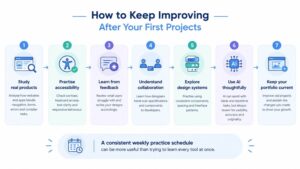
Develop these habits:
- Study real products: Analyse how websites and apps handle navigation, forms, errors and complex tasks.
- Practise accessibility: Check contrast, keyboard access, text clarity and responsive behaviour.
- Learn from feedback: Review what users struggle with and revise your designs accordingly.
- Understand collaboration: Learn how designers hand over specifications and components to developers.
- Explore design systems: Practise using consistent components, spacing and interface patterns.
- Use AI thoughtfully: AI tools can assist with brainstorming and repetitive tasks, but you must review outputs for usability, accuracy, accessibility and originality.
- Keep your portfolio current: Improve old projects when you discover a better approach, and explain the changes you made.
For learners balancing study with employment or other responsibilities, a consistent weekly practice schedule may be more useful than trying to learn every tool at once.
Finding a Learning Route That Fits Your Career Goals
A UI/UX career can be approached from several starting points. You might be a school leaver exploring digital careers, a graduate looking for a specialisation, a working professional seeking a transition or someone returning to education after a break.
Begin by identifying your immediate objective. Do you need a recognised academic qualification, practical design training, a stronger technical foundation or a portfolio that demonstrates your current abilities?
If you are comparing distance education in bangalore, review the specific programme’s eligibility, curriculum, recognition, learning format and assessment requirements. Also check whether you can manage its workload alongside your other commitments.
For learners considering further study, correspondence degree colleges in bangalore may be part of the wider academic search. However, verify the institution and programme details directly, and distinguish general IT or computing education from specialised UI/UX training.
United Correspondence College is a place to explore when researching academic pathways and learning options. Visit UCC to review the available information, then confirm whether a programme matches your qualifications and future plans. Do not assume that a particular UI/UX specialisation is available unless it is explicitly listed.
The Government of India’s Skill India Digital Hub is another useful resource for exploring skill-development courses, certifications and related opportunities.
Ultimately, your education should support your goal, while practical projects help you demonstrate what you can do. Choose a learning route that you can sustain and connect it with regular design practice.
Frequently Asked Questions About Becoming a UI/UX Designer
1. Can I become a UI/UX Designer without a design degree?
Yes. Some employers consider candidates from different educational backgrounds, particularly when they can demonstrate relevant skills and a strong portfolio. However, qualification requirements vary by employer and position. A relevant degree or diploma may be required for some roles.
2. Is coding compulsory for UI/UX design?
No. Many design roles do not require you to write production code. Nevertheless, basic HTML and CSS knowledge can help you understand responsive layouts, communicate with developers and recognise technical constraints.
3. Which software should a beginner learn first?
Figma is a practical starting point for learning wireframing, interface design, components and prototyping. Focus on understanding design principles and completing a project before moving on to several additional tools.
4. How many projects should a UI/UX portfolio contain?
Two or three well-documented projects can provide a useful starting point for a beginner. Prioritise the quality of your problem-solving, design decisions and case studies instead of adding numerous unfinished screens.
5. Can students from a BCA background become UI/UX Designers?
Yes. A BCA background can provide useful computing knowledge, while specialised design learning and portfolio projects help develop UI/UX skills. Your ability to explain and demonstrate design decisions remains important.
6. Can working professionals switch to UI/UX design?
Yes, provided they are willing to learn the relevant skills and practise consistently. Professionals from IT, marketing, customer support, business analysis and other fields may bring transferable knowledge, although they will still need to demonstrate design ability.
7. Is UI/UX design a good career choice in India?
It can be a suitable career for people who enjoy understanding users, solving problems and working on digital products. Opportunities vary by location, industry and experience, so research current vacancies and build skills that match the roles you want.
8. What is the difference between a UI/UX Designer and a Product Designer?
A UI/UX Designer typically focuses on the interface and user experience. A Product Designer may work more broadly across user needs, product objectives, research, design and collaboration throughout product development. In practice, responsibilities often overlap.
9. Can I learn UI/UX design while studying through distance education?
Yes. A flexible academic schedule can make it easier to set aside time for design practice, depending on your programme requirements. Combine your studies with regular exercises, portfolio projects and feedback rather than expecting an academic qualification alone to teach every specialised design skill.
10. How can I find my first UI/UX job?
Create a portfolio with clearly explained case studies, prepare a relevant résumé and apply for suitable internships, junior positions or entry-level design roles. Practise explaining your decisions, learn from interview feedback and tailor applications to the responsibilities listed in each vacancy.
Conclusion: Start with a Problem, Not Just a Design Tool
Becoming a UI/UX Designer is a process of learning to understand people, organise information and turn complex tasks into clearer digital experiences.
You can start by observing everyday apps, learning fundamental design principles and practising with a tool such as Figma. As you progress, create projects that show your thinking, test your ideas with real users and use feedback to improve your work.
Whether you are a student, a graduate, a working professional or someone returning to education, the best starting point is a realistic plan that connects learning with practice. Choose an appropriate educational route, develop relevant skills and build a portfolio that demonstrates your ability to solve problems.
Ready to explore your next learning step? Visit UCC to explore available academic options. If you need clarification about a programme, eligibility or the learning format, contact us through the website before making your decision.
Your first design does not need to be perfect. It needs to be the beginning of a process in which you learn, test, improve and become a more thoughtful designer.